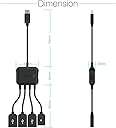
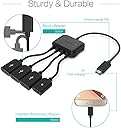
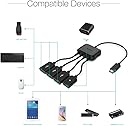
🔗 Connect, Charge, Conquer! Your tech's new best friend.
The TUSITA Micro USB HUB Adapter is a versatile 3-port charging OTG host cable designed for seamless connectivity with a wide range of devices, including Raspberry Pi models and various Android smartphones. With a compact design and efficient power management, it ensures reliable performance for data transfer and device expansion.
| ASIN | B00LTHBCNM |
| Best Sellers Rank | #1,399 in USB-to-USB Adapters |
| Brand | TUSITA |
| Color | Black |
| Compatible Devices | Fire Stick, PlayStation Classic, Raspberry Pi Zero, Sega Genesis Mini, S/NES Classic Mini and More |
| Connector Type | usb;micro-usb |
| Current Rating | 2 Amps |
| Customer Reviews | 4.2 out of 5 stars 4,018 Reviews |
| Finish | Orange |
| Input Voltage | 5 Volts |
| Item Dimensions | 2.36 x 1.18 x 1.18 inches |
| Item Weight | 0.02 Pounds |
| Item dimensions L x W x H | 2.36 x 1.18 x 1.18 inches |
| Manufacturer | TUSITA |
| Mfr Part Number | 1234 |
| Model Number | 1234 |
| Nominal Power | 5 Watts |
| Number of Items | 1 |
| Number of Ports | 3 |
| Package Quantity | 1 |
| Power Plug Type | No Plug |
| Smart Home Compatibility | Not Smart Home Compatible |
| Specific Uses For Product | Camera |
| UPC | 797698828596 |
| Unit Count | 1.0 Count |
| Warranty Description | 18 Months |
S**N
Use 5V 1A plug and it works very well.
This works on my Toshiba Encore 2 when I combine it with a 5V 1A power adapter. The Amazon listing says to use a 5V 2A power adapter. This did not work for me. Using 5V 2A (and 5V 1.8A) adapters caused it to get extremely hot and also made USB connections unstable. With the 5V 1A power adapter I am able to charge it and some low power USB items (keyboard, mouse, USB thumb drive) still worked while charging. With the 1.8A and 2A adapter, charging did not work at the same time as any USB device and some devices would not recognize. Totally worth the money but pay attention to which USB adapter you use with it.
K**6
Excellent Customer Service
At first, I gave this one star because: Original Review: 'Would not switch from Charge to OTG. Moved switch back and forth and it broke. Poor factory quality control. Either it works or it doesn't. Read the reviews. So cheap, Seller probably makes money on the ones not sent back. Suspect all these on Amazon are made at same factory in China. Read their reviews. Same problems. They work or they don't." I was then contacted by Kirin, who gave me a refund, and informed me they shipped me another. Well, the replacement works perfectly on my tablet. The infrafed mouse needs to go directly to tablet through a separate USB port because it requires a power source, But I hook up my keyboard,USB flash drive and flight stick at the same time and they all work. FYI, the mini-plug is used to charge attached devices, not the tablet. My tablet uses a separate power plug, so I don't know if my infrared mouse will work, but it should. That is, smart phones use a mini-plug to charge, which is the connection used to attach this hub. Thank You again.
J**N
Works as advertised - either charge OR OTG, not both
This micro-USB OTG hub works great and provides 3 USB 2.0 ports out of the single micro-USB port on my Asus T100TAM 2-in-1 notebook/tablet. Without using extra power input, it has no problem running relatively low-power devices like USB flash drives, but a USB-powered DVD-RW drive doesn't spin up or work properly, but I wasn't really expecting it to work. More power-hungry devices, like this portable DVD drive, requires plugging power into this hub via the "4th" port (also micro-USB). A note about the Charge/OTG selector switch... In the "Charge" position, the power that you plugged into the "4th" port mentioned above will pass-through to charge your device but - at least on this Asus T100TAM - the OTG functionality is disabled. In the "OTG" position, the "USB hub" functionality is enabled and the power-in will provide power for the hub's USB ports, but pass-through charging of the tablet is disabled. In other words, you can choose whether you want to charge your device *OR* use OTG USB accessories, but you cannot do both at the same time. (Like I said, at least this is how it is with my particular tablet - your mileage may vary.) Before I bought the Asus T100TAM, I called Asus and asked whether the Micro-USB port could be used for charging *and* OTG *at-the-same-time* and I was told, yes, it could do that. This is clearly not my experience with this OTG adapter. I cannot tell whether the issue is 1) a mis-informed pre-sales technical support representative, 2) the charge/OTG switch on the hub physically changes modes of operation of this hub device, or 3) the tablet disables charging when it sees its micro-USB port being used in "host" mode. (I have read that many tablets switch from "charge" to "boost" mode automatically depending on what's plugged into the Micro-USB port, but some reviewers here have reported their tablet devices doing both charging and OTG at the same time). Regardless, I was not expecting to charge and use OTG functions at the same time, so I'm not disappointed. As it is, one of the things that attracted me to the T100TAM is the advertised 10-hour battery, so not being able to charge while using OTG accessories is not a deal-breaker for me. Overall, this Micro USB OTG hub works as expected and does what I need it to do. In the end, whether this OTG hub is going to work for you is going to come down to what you need/want to do and what your device(s) is/are capable of doing. And don't expect your device manufacturer to know the answer. You may just need to roll the dice and buy an OTG adapter to find out... at this one's price-point, that's not a bad thing to do.
A**N
Great for charging your Android tablet or phone while using external USB devices, IF your device supports this
This is a great little device. I tried it on my friend's Galaxy S5 and it worked perfectly. Setting the switch to "OTG" charges the phone at the same time as allowing all the connected USB devices to work as well. This is VERY cool. (Incidentally, my UCA202 external USB DAC works perfectly on the S5 as well with out sending all music through the DAC automatically!) I tried using this on my Nexus 5 and sadly it would not charge the phone at the same time as using OTG devices. (The connected USB devices did work normally though.) This is clearly a limitation of the phone -- or perhaps the kernel. In no way is this little box at fault though... I will test on my Nexus 7 2012 (with CM11) at home and see if it works on that, which would be useful. I seem to recall at least on the N7 2012 there are kernels available that enable this type of operation. Setting the switch to "Charge" simply directs your USB charger current into the phone as normal (like a bypass.) This worked fine on my Nexus 5 and on the Galaxy S5.
J**E
Junk
Like others have posted this device is sketchy. The switch on the side says Charge and OTG. Neither charge the phone when a power cable is inserted in the micro female input. The warning on the device is not to use a fast charger and stay within 4.7v-5v 2Amp max or the chip will burn up. Wonderful! Potential fire hazard! This thing doesn't charge anything with a 5v/2A with the selector switch in charge or OTG. If I leave it unplugged from the phone and the power adapter I have connected to it will power devices. Again the switch selector makes no difference. If I unplug the power cord and plug the tri-usb OTG into the cell phone it will also power the devices plugged in using the cell phone battery. This I think is dangerous to the phone as it seems to trick it. I have a bore camera that has a light and draws to much power. The cell phone even says a message that the bore cam requires a powered hub plugging it in directly into the phone. This is the reason I bought this device to isolate the device from the phone to inject power to the bore camera. If I plug the power back into the tri-usb OTG adapter, I cannot tell if it is pulling power from the wall or power from the cell phone?? It pulls power without the wall power. So who knows what the hell this things is doing at that point! If I have wall power connected or disconnected it the bore cam works in OTG (switched) I just can't tell if it is using wall power or not. That's a issue there and could kill the battery in the cell phone I imagine and I don't trust this stupid thing. If the power is connected to input side of the tri-usb OTG cable and I switch it to charge with or without anything connected the Samsung Galaxy trips a error saying there is water detected in the power indicating there is obviously a short. Wow, this thing is sketchy as hell and avoid it at all costs. I can use it somewhat pairing it to a (real) "CyberPower" 4 port 5v@2.5A powered hub and run the mini usb to the the USB of the tri-usb OTG input and just ignore the mico power dongle on it for input power. So far I am not impressed with the engineering of such a simple device. I could of probably just ordered a mini to micro cable and used this "Cyberpower" hub I have had for 10 years now and not have to worry about some pos burning my house down.
P**E
Works like a charm! Using it with a cheap android box, the ONN one, and it's a great upgrade
I bought this for my cheap android tv box, the Onn walmart one, because it uses micro USB but has no expansion ports. Once I used this dongle, I have USB ports and was able to plug in a flash drive, a controller dongle, and I'm considering a mouse/keyboard combo, and suddenly it's just as good as an Nvidia Shield in practice. Storing all my big files on the flash so I can use the limited space just for the apps, and I'm looking up how to make it "extended storage", but that's neither here nor there. The only issues I"ve had so far is that the connection is fairly slow- USB 1.0 or a weak 2.0, and I've got to check if some of the slowdown and lack of write access to the flash drive is because of the dongle or the flash drive. I believe it's the flash drive, but be mindful. But that said, it worked immediately and natively, and I didn't need to even activate an OTG mode in Android! I'm thinking of sticking it to the bottom of the ONN box so I can keep them inseparable from now on!
P**L
OTG functions well, and unit will trickle charge some phones.
Works nicely with the HTC One M8 and the Lenovo IdeaTab, and allows for multiple devices like mice and keyboards. It will charge phones, but slowly. It did not pass enough current to charge the Lenovo tablet, but that was expected. Now, about the female micro USB port and that mystery switch on the side: The port is for power input from a charging device only, it does not pass data or work for HDMI output. When using this port for power, the switch on the front of the unit will send power to the OTG devices (like keyboards or mice) when set to "OTG", and reduce the drain on the phone battery. When this switch is set to "Charge", it will send power to the phone. It is only enough to trickle charge the phone (seems to be about 0.5 amp output), and some devices will display a message asking to use the original charger for your device, but it will charge. This is fine for me, and is better than not having the option to charge at all like most devices.
B**N
The Only thing that works with Firestick 4X max + USB HUB
My Experience identical to that of "Nelson" in this review section - his review dated 9/9/22. For me - this is the only way I can connect my USB flash drive and my 2TB hard drive to the Firestick 4K max. Nothing else works. I was trying to connect Sandisk flash drives of various sizes, 32GB, 128 GB, 256GB - to my Firestick 4k Max. Also a 2TB Toshiba Hard drive USB 3.0. I am connecting both devices onto a USB hub with external power supply. [Ugreen USB 3.0 Hub Ethernet Adapter + a separate Ugreen AC DC Power Adapter 5V2A]. Like Nelson, I tried the AuviPal 2-in-1 Micro USB to USB Adapters sold in Amazon - total fail - with my hub connected, and my hard drive and flash drive attached to the hub, Firestick would never recognize either drive. However, if I only plugged one device directly into the Auvipal OTG cable, that device would work. Very strange. But would not work through my USB hub. I tried those little 90° adapters. [AuviPal 2-in-1 Powered Micro USB to USB OTG Adapter 90 Degree Right Angled] and the exact same outcome: a device plugged directly into the adapter worked. But if I tried to plug in my USB HUB, then put on or both devices on the HUB, then neither device would be recognized by the Firestick. Can't figure it out --- but when I use this TUSITA - what I call the "spider adapter", then I can connect my HUB, and BOTH a Sandisk 128GB flash drive and Toshiba 2TB hard drive to the hub, and all works well. I'm using the flash drive as internal memory. So it's the only way for me to connect multple other devices to the Firestick 4k max - see if you have the same experience.
D**S
Praktisch für Spezialfälle
Sehr nützlich. Ich habe noch ein älteres Windows Tablet das nur einen Micro Ausgang hat. Um separate Tastatur und Maus anzuhängen (welche nicht ein Set sind) braucht es schon einen Doppelstecker. So hab ich noch Platz für einen USB Boot Stick.
M**K
USB PEN Drive not working
USB PEN Drive not working Properly, but it good for keyboard and mouse
S**O
Justo valor
Da la opción para conectar una usb de 32mb y con una de 64mb con pelis o series y que sea leida por el firestick, trate con un DD de 2 tb pero le hace falta energía, solo es cambiar el cargador, que no sea el que viene en la caja del firestick sino uno más potente
C**N
Funziona molto bene
L'ho usato con un tablet, per collegare un pad per fare musica, funziona benissimo sia col pad, sia con chiavette USB. Lo consiglio (verificate che il vostro dispositivo sia compatibile per OTG)
M**Z
Llego rápido
Muy bueno
Trustpilot
3 days ago
3 weeks ago