🎞️ Relive, Restore, and Reboot Your Memories in HD!
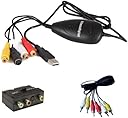
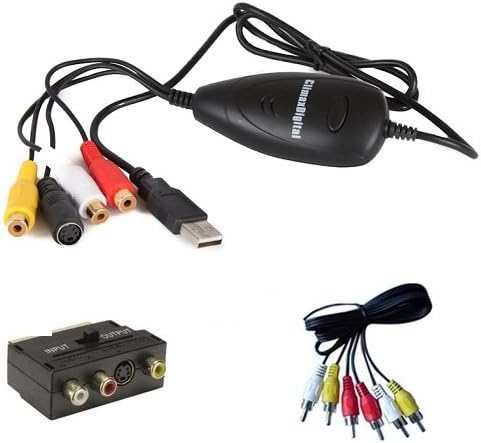
The VCAP302 USB 2.0 VHS to DVD Video Capture Kit by ClimaxDigital offers a professional-grade solution to convert analog tapes into high-quality digital MPEG 1/2 files. Compatible with Windows 10 through XP and supporting Xbox 360/PS3 color recording, it delivers NTSC and PAL video capture at up to 720x480 resolution and 30fps. The kit includes AV cables, SCART adaptor, and user-friendly editing software with direct YouTube upload, making it the ultimate tool for preserving and sharing your vintage video collection.
| ASIN | B003PSI73G |
| Brand | ClimaxDigital |
| Colour | Black |
| Customer Reviews | 4.2 4.2 out of 5 stars (589) |
| Date First Available | 5 Jun. 2010 |
| Guaranteed software updates until | unknown |
| Item Weight | 0.28 Kilograms |
| Item model number | VCAP302 |
| Package Dimensions L x W x H | 16.2 x 14.2 x 5.2 centimetres |
| Package Weight | 0.28 Kilograms |
| Part number | VCAP302 |
| Size | VHS to DVD Kit Black |
L**N
Cheap, easy and completely functional for use with Nintendo wii
I ordered this about 6 months ago and have used it every day since to record footage from my Nintendo wii with great results, it came fast after delivery and i managed to use it the first day i received it, the only problem was that the CD that came with it didn't install when inserted into the tray nor did the hardware(on windows vista laptop)but i went onto the website and managed to download both from there with ease, i have recorded about 20 videos and all have been good quality even on the low quality setting, to record the footage properly you have to go into the Wii settings and change the screen setting under Screen and then tv type to 50HZ(576i) instend of the default 60Hz(480i) and then the picture and sound will come on the preview screen(i personally don't see any difference) if the Wii is plugged into the device at the bottom or via 3 y splitter, i would personally recommend the y splitters and double sided AV cable method(because the preview screen can lag making it hard to play off of but the finished recording shows no or next to no lag with video and audio always in sync) which the device helpfully comes with, so you only have to buy the y spitters for 70p each from amazon with good results, finally the editing software included is simple but functional and you can still cut unwanted parts out and edit two or more clips together with effects and transitions but if it is to simple for you the files will work in Windows movie maker or any other editing problem, in conclusion this is a great capture device that gets great results and in total with the y splitters only costs About £21 and gets results from experience better than the Pinnacle dazzle dvd recorder which is twice the price and the Roxio game capture which is 3 times the price, it can also be used for recording any other consoles or devices with rca cable input also the systems requirements are low so it should work on most laptops or desktop computers. I highly recommend it. Update have been using for 6 months on lots of different games including gamecube games and the results have been great
B**C
Brilliant product - exceeded my expectations.
This has got to be one of the most satisfying buys I have made recently. Fantastic value for money. Install (onto Windows 7) was straightforward - no issues at all. Have captured footage off Hi8 tapes, Digital CamCorder, VHS and DVD. Resulting quality better than I expected and I am only outputting to standard quality MP4 files. Only difficulty I had was connecting to VHS output via the composite leads - until I realised the VHS machine ports were not great, so I used the supplied SCART connector (remember to flick input/output switch!) and all was fine. Editing and effects tools in Showbiz limited, but fine if you want to trim the vidoes, add titles and some fade-in/-out effects. One tiny tiny bug in Showbiz text editor - but nothing major. All in all - this exceeded my expectation for a product of this price. Very good indeed
A**R
Good Value Product Worth Looking At For VHS-to-DVD Transfer
The first thing you must understand is that this device is primarily designed to transfer your old 4:3 ratio VHS tape video footage to a PC for transfer, if you wish, to DVD. As all 80s and most 90s broadcasts were in 4:3 ratio to start with, this will not be an issue. Despite the info in the sales ad stating you can record from a set top or sat box, you will not get a 16:9 ratio widescreen recording. Instead, the 16:9 footage will be squashed into 4:3 format. However, the included instructions clearly state in no uncertain terms that the footage can be re-stretched back into 16:9 ratio via some free software (WinFF). The instructions clearly state the download and workaround procedure for this action. Secondly, whilst the Scart adaptor is of solid build and a welcome adition to the package, should the sockets of your VCR be sunk into the casing of the machine, you may have difficulty connecting the adaptor. This is because the casing of the Scart adaptor extends approx 5mm from the pin-connectors and as a consequence may hinder connection into the said VCR socket - so you may have to purchase a more suitable Scart-to-composite or Scart-to-Scart adaptor. The biggest let down to the whole package is the included software. On testing it struggles to keep up with fast panning footage, such as a horse race or football match, which results in a stuttering/skipping effect. This is only a software issue and does not do justice to an otherwise top product, however, quality third party software should offer much better and somewhat smoother performance result. As for the product itself, the device does what it says on the box. It records good quality 4:3 ratio footage. The supplied composite leads are of good quality, and the Scart adaptor works fine, so long as your sockets are no inset. I was pleased with the recordings made by the device. The device records video via the composite/Scart output of your video device. You won't need to use the Scart adaptor if you have video/audio composite outputs. The Scart adaptor has the composite cables built in, and they will link directly to the capture device. The capture device then slots into your USB2 port. You then use your software to capture the footage. ClimaxDigital responded to all communications and even after the 14 days expiry date for returned goods, still offered a full refund to me if I was not pleased with the purchase. I decided to keep the device becuase it will suffice for old VHS tape transfers of which I intended the device for. Certainly good value for the price, and a great little company, but a better Scart adaptor and improved software would have given it a higher star rating from me. Overall well worth looking at if your only intention is to transfer VHS tapes to PC/DVD. Fully W8.1 compliant.
A**N
Very easy to use and works great
Initially after reading the reviews of many who said the device does not work with windows 10 I still went ahead and bought it and all I can say is that if you follow the instructions I experienced no issues, it worked out of the box with windows 10 and I have not experienced any problems. The only problem I had was trying to copy one home video from VHS to digital and it fails due to some copy protection which is bizarre as it is a home video and not a studio produced VHS, but the work around is to record the video from the TV output and not the VHS. It just means you have to wait for the entire video to play out on TV whereas copying from VHS directly you are not tying up the TV and can watch something else while the recording is going on. For widescreen VHS you can alter the settings of the recording software to support wide screen video. It's a very good product and the included software works excellent and is very easy to use.
Trustpilot
2 months ago
2 weeks ago