🚀 Boost Your Wi-Fi, Boost Your Life!
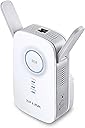
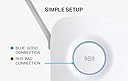
The TP-Link AC1200 RE350 Wi-Fi Range Extender expands your wireless coverage with dual-band AC1200 speeds, a smart LED signal indicator for optimal placement, and a Gigabit Ethernet port for wired device connectivity. Compact and easy to install, it eliminates dead zones and dropouts, backed by 24/7 technical support.


| ASIN | B01K2V35US |
| Best Sellers Rank | #2,912 in Repeaters |
| Brand | TP-Link |
| Built-In Media | AC1200 Wi-Fi Range Extender RE350RJ-45 Ethernet CableQuick Installation Guide |
| Color | White |
| Compatible Devices | Router |
| Connector Type | RJ45 |
| Customer Reviews | 3.6 out of 5 stars 430 Reviews |
| Frequency Band Class | Dual-Band |
| Frequency Bands Supported | 2.4 GHz, 5 GHz |
| Global Trade Identification Number | 00845973092481 |
| Item Type Name | AC1200 Wi-Fi Range Extender |
| Item Weight | 1.2 Pounds |
| Manufacturer | TP-LINK USA |
| Mfr Part Number | RE350 |
| Model Number | RE350 |
| Range | 1000 square_feet |
| Special Feature | Intelligent Signal LED Ring |
| Special Features | Intelligent Signal LED Ring |
| UPC | 845973092481 |
| Warranty Description | 2 Years |
| Wireless Communication Standard | 802.11a/b/g/n/ac |
| Wireless Compability | 802.11a/b/g/n/ac |
C**B
Love it!
I got the TP-Link touchscreen Wi-Fi Range Extender last May for my work computer bec the router is in the living room and my Aruba device has to be connected directly into the router. I wasn't about to start drilling holes or run cables underneath the house so I decided to try a Wi-Fi Range Extender to see if that would work. It did! So, this time, I needed one for a new treadmill that I got that needs to have the router close and the home gym is one room further than the home office, LOL Too much stuff in between. When the treadmill failed to connect, I realized that even though it detected my Wi-Fi, the router was probably too far. So, I got a smaller Wi-Fi Range Extender, one that plugs into a wall, that was half the price (for work, you really can't have it disconnecting so I went with a more expensive one) So far, this thing works like a charm! I don't like that it has to go in the bathroom but that isn't its fault, LOL The mid point of the router and the treadmill is the bathroom and the only thing it does is replace a motion sensor night light and this actually kind of works as a night light bec of the pretty blue light that stays solid when there is a solid connection. The home office is also in the middle but I have no more available outlets and I also worry that there might be inference with the Range Extender that's already in that room. So, better safe than sorry and it's fine in the bathroom! It is solid blue all the time which means the connection is strong in that location and I am able to connect to my iFit workouts on the treadmill!
A**O
Three Stars
Easy set up but does not provide reliable wifi to the room that it is being used for.
G**N
Beware Of Tech Support
I tried to install the device for three hours without success. Eventually I contacted Tech Support. They made a cursory attempt to help me and then fobbed me off on a third party security company. This company found some supposed problems with my laptop that (they said) were preventing the installation. They wanted $189 to clean up my laptop and guaranteed that the extender would then work. I smelled a rat and, of course, did not go for this. Instead, I bought a Netgear extender and it installed immediately and works great. There was nothing wrong with my laptop. You can draw your own conclusions from my experience.
R**E
Bridge me up Scotty!
Love the product, very easy to set up. You have options to mimic your current SSIDs or create new SSIDs for devices to log onto. The only con I have with this device is the Front LED is Red about 40% of the time which typically means it not connected to your wireless network even though when I check the device status through the web GUI it always says connected. So I just turned off the LEDs through a option through the GUI. I did tests before and after installation and I'm getting very good results about 30 feet away from the main AP/Router (Linksys). I only have a 65Mbps internet connection and that's what I'm getting even in the furthest areas of my 2900 square foot house. Before he extendeder was in place I would only get around 5Mbps.Would highly recommend.
T**W
It was easy enough to install and get working
I paired this with a Motorola modem/router. The router is located about 20 feet from the Extender and through 3 walls and a change in floors. It was easy enough to install and get working. The PC I was trying to reach is another 20 feet from the Extender. Before the Extender download speeds were 8Mbs at best. With the Extender at 2.4Ghz it jumped to 28Mbs download! Then I tried running an Ethernet cable from the Extender to the PC and it jumped to 52Mbs. OMG, I think that is great as the original router with a wired cable gets 75Mbs. My provider caps upload speeds at 6Mbs and that is what the Extender provides whether wireless or wired. In my case it's all about the download speeds. I'm happy with the purchase and glad that it offered the Ethernet connection option. BTW, I choose the flat Ethernet cable on Amazon as that allowed me to squeeze it down between the carpet and the baseboard and for most of the run it is invisible. No holes, no staples, nothing to see, Great! I've connected a couple of security cameras to this Extender. While they continue to work I'll need to figure out how to set up port forwarding from my router and port forward again on the Extender. I see some help on line but haven't attempted it yet.
B**R
Not Consistent Performance, Sometimes Won't Connect at All
My background: I've tried wi-fi extenders in the past with poor results. Struggled for hours and still didn't work consistantly. Never knew whether my using a password was causing problem or not. New AC1200: After reading some of the reviews, I wasn't sure things had gotten any better than last time. Watched the videos and they did not help at all. Just mostly adveritsements for the product. Sat down and read the instruction sheet, and carefully followed the directions. Surprise, surprise it worked. Now instead of getting 2 bars on other end of house, I'm getting 5 bars. Sweet! I'm using exact same SSID and same password as primary wi-fi router. Easy peasy. Time will tell if that's a bad idea or not, but so far, so good. Way easier than I had feared. Would recommend to my mother ... well on second thought. :) Edit: After using this Range Extender for about a month, I've decided to return it. With a solid blue light (meaning it has a good connection to my home wi-fi) sometimes I get a good connection with my laptop and other times it takes a long time to connect and then everything is slow. Not very consistent in it's performance. Can't recommend.
L**S
Love the Access Point Mode!
My old wi-fi extender could not keep up with the increase in iPhone/iPad/Laptop browsing and video streaming we do in our living room so I started looking for an upgrade. Over time the price has come down on this level of product so it was now within my cost range. I love the range of features including the dual band support, the ability to connect a TV or game console directly via the Ethernet port. The "5-star" feature for me was the ability to use it as an Access Point (AP mode). This means you can use the Ethernet port to connect it to your router and this unit can broadcast its own dedicated Wi-Fi network. That way you get a super strong signal and really high speed if you are in the same room as this device. It means you are sitting right next to the original Wi-Fi router so it's faster than if it was just grabbing a Wi-Fi signal from another room and extending it. This is how I use the device since I have an Ethernet jack in the wall of my living room that connects directly back to my cable modem. Now we can both stream videos with no problems.
A**E
Would not help for your phone or PC connection
My PC and my router are 30 feet apart and there is a "Г"-shape ail connecting them. So, bassically, there is a single sharp turn between the router and the PC. I get the signal from the router, but it is not stable and drops every hour or so. I installed the repeater at that corner, producing more or less direct visibility between the router and the repeater, and between the PC and the repeater. And it failed miserably, quality of connection got worth. I got a second router instead, from the same producer and for the same price as this repeater, and installed it right next to my original router. And, guess what, I have a steady signal now. I can not recommend this device. It can work with your "reoder detergent" button or a smart light control, but can not provide an improvement for a device as a phone or a laptop.
G**4
Working well
Product working well and delivered ahead of schedule. Nice one!!
T**M
Great extender, probably the best price/performance option in this power category
4.5 stars. I purchased this router extender as a gift to my parents. Their Wi-Fi signal wasn't strong enough for them to surf the web outside of the house while sitting in their backyard. This range extender has solved the problem. While not being the most powerful extender out there, I think it has the best power/price ratio on the market. Don't get me wrong, this little fellow with cute ears will be enough for most users. It is not the weakest extender out there. It's a midrange device, so if you're not a hardcore gamer or have many users surfing the web at the same time (or watching Netflix, AppleTV, etc.), it will be enough to cover a dead Wi-Fi area around your home. It has a modern and sleek look, and the build quality is very good. It has blue LED indicator lights that you can turn ON or OFF with a button on the side on the device, which is great. It looks great with the blue lights ON but sometimes you want the device to be unobtrusive. Another thing that I like is that it reconnects itself to the router automatically after a power outage. No need to do anything. It is designed so that it leaves enough space for plugging another item in the 2nd electrical wall outlet. It will not allow you to plug anything in the adjacent outlet but it should work in most cases (except maybe some big wall warts). I removed a half-star in my rating because like many devices related to Routing, these things are often confusing to set up because of the multiple standards in the industry... It is not necessarily related to this particular device, it is just that even with the instructions provided with the device, it can get confusing, especially if you are trying to extend the range of an OLD Wi-Fi router. If your router is OLD, I would suggest that you don't bother with the supposedly easy WPS installation option since there's a high probability that your old router doesn't support it. I would suggest to make the installation of the range extender using the WEB-BROWSER installation option. This option has worked well with my parents router which is a little bit old. But honestly, it is not that difficult to install, and there aren't many steps. And all range extenders are like that, this is no exception. So, if you are looking for a good bang for your buck, I think that this extender (and the pricier/more powerful models in this series) is a very good choice. It looks great, performs well, is portable, and will fix most dead-spot Wi-Fi issues. My advice is not to buy the less-powerful models in this series, or by other brands as well. The problem with weak extenders is that for many users, it will not improve their coverage at all, and in some cases it will make their Wi-Fi signal even weaker because extenders have a tendency to extend the range of the signal but lower the strength of the signal at the same time. So for that reason, it is better to buy a middle to high power extender or look for a new, more powerful main router. Extenders don't solve all issues, so sometimes a new router is a better option (but pricier). So I would buy no less than AC1200 Dual-Band. I am very satisfied with this extender. I highly recommend it.
B**A
Buen producto
Fácil de instalar, funciona muy bien, pude instalarlo cerca del punto donde no tenía acceso a internet, ahora tengo señal completa tanto en mi celular como computadora, lo mejor de todo es que es inálambrico por lo que no tienes que andar lidiando con metros y metros de cable ethernet
A**R
Works great but you need to optimize the location with trial and error
The extender is very easy to install and use. However, you really need to work a bit to find the most optimal location to install it. I had a room in the house with dead spot and it took me several iterations and positions that I had to try before I found the right spot. If you don't find the right location to place it, it will work fine on and off and you will not get a stable internet connection. I would recommend that you try one location and run a continuous ping test on a computer and let it run for several hours and see how it works.
T**G
Excellent! Plugged it in syned with my router and ...
Excellent! Plugged it in syned with my router and works perfectly so easy to set up and now I can connect my smart TV to the internet. Fast shipping excellent seller. I ordered another one for this one is great!!
Trustpilot
3 weeks ago
1 month ago