Buy anything from 5,000+ international stores. One checkout price. No surprise fees. Join 2M+ shoppers on Desertcart.
Desertcart purchases this item on your behalf and handles shipping, customs, and support to Cook Islands.
⚡ Dominate your digital domain with Nighthawk’s unstoppable speed & security!
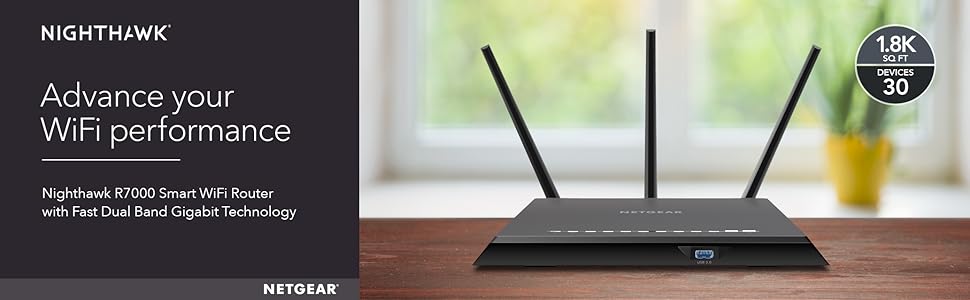
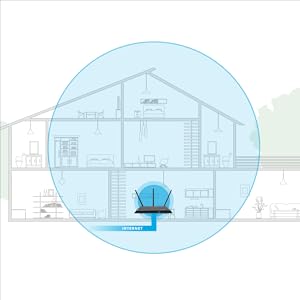
The NETGEAR Nighthawk R7000 is a high-performance AC1900 dual-band WiFi router delivering up to 1900 Mbps speeds and coverage for up to 1800 sq ft and 30 devices. Equipped with a powerful 1GHz dual-core processor, 3 amplified antennas with Beamforming+, and advanced features like Dynamic QoS, Alexa voice control, and Netgear Armor cybersecurity, it ensures fast, reliable, and secure connectivity. Wired options include 4 gigabit Ethernet ports and 2 USB ports for shared storage and peripherals. Ideal for professionals and smart homes demanding robust, lag-free networking.


| ASIN | B00F0DD0I6 |
| Antenna Location | Security |
| Antenna Type | Retractable |
| Best Sellers Rank | #10,354 in Computers & Accessories ( See Top 100 in Computers & Accessories ) #367 in Computer Routers |
| Brand | NETGEAR |
| Built-In Media | Network cable, Software, Wireless router - 4-port switch (integrated) |
| Color | Black |
| Compatible Devices | PC, Mac, Unix |
| Connectivity Protocol | ethernet, wi-fi |
| Connectivity Range | 1800 Square Feet |
| Connectivity Technology | wireless |
| Control Method | Voice |
| Controller Type | amazon_alexa, vera |
| Coverage | 1800 square feet |
| Customer Reviews | 4.3 out of 5 stars 21,369 Reviews |
| Data Transfer Rate | 1300 Megabits Per Second |
| Frequency | 1 GHz |
| Frequency Band Class | Dual-Band |
| Global Trade Identification Number | 00606449099812, 00606449099843 |
| Is Modem Compatible | No |
| Item Dimensions L x W x H | 11.22"L x 1.97"W x 7.26"H |
| Item Type Name | Netgear Nighthawk AC1900 Gig Router (R7000-100PAS) |
| Item Weight | 1.77 Pounds |
| LAN Port Bandwidth | 10/100/1000 (Gigabit) |
| Manufacturer | Netgear |
| Maximum Upstream Data Transfer Rate | 1300 Megabits Per Second |
| Mfr Part Number | R7000-100PAS |
| Model Name | R7000 |
| Model Number | R7000-100PAS |
| Number of Antennas | 3 |
| Number of Ports | 5 |
| Operating System | Microsoft Windows 7, 8, 8.1, Vista, XP, 2000, Mac OS, UNIX, or Linux |
| Other Special Features of the Product | QoS, WPS |
| Security Protocol | DoS attach prevention, Double Firewall protection (SPI and NAT), WPA/WPA2 - PSK |
| Smart Home Compatibility | Smart Home Compatible |
| Special Feature | QoS , WPS |
| UPC | 655199176212 606449099843 606449110425 |
| Warranty Description | 1 Year Limited warranty |
| Wi-Fi Generation | Wi-Fi 5 |
| Wireless Communication Standard | 5.8 GHz Radio Frequency , 802.11a/b/g/n, 802.11ac |
| Wireless Compability | 5.8 GHz Radio Frequency, 802.11a/b/g/n, 802.11ac |
S**.
Perfect Router for using DD-WRT
I purchased this router to replace a old Apple Airport that I have had since 2008 to be able to take advantage of the 802.11ac that my mobile devices and laptop are able to use. I am an IT Pro by day but never got around to replacing the AirPort as it did what it needed to do and did not want to spend the money on something new just yet. However, now that all of my mobile devices and work laptop can use 802.11ac, I decided to go ahead and purchase something to replace it as I wanted to get the most out of my network and because of the 1TB HDD bundle that the Nighthawk included. Background on Network - My home was wired with Cat6 drops in every room of the house by myself and tested to insure connections were solid. The cable modem is a ARRIS SB6121 that I purchased from Amazon to replace a older DOCSIS 2.0 modem that could not longer handle the DL speed from my ISP. Reason for Purchase - After reading many different reviews on Amazon and Newegg on many different routers my choices were the TP-Link Archer C7, Asus RT-N66U, Asus RT-AC68U, and Netgear Nighthawk. I chose the R7000 based on the reviews online, the constant support by two devs on the DD-WRT forums, and because of the 1TB Toshiba HD bundle. Setup/Configuration - I ordered it on Friday (7/3) and received it at my door on Sunday (7/5). It was set up later that night and I began to upload the custom DD-WRT firmware by Kong that I got from the DD-WRT Forums. Once uploaded, the setup was a breeze and after following a few guides from the forums, I had the Wireless setup for 2.4Ghz and 5Ghz with two separate SSIDs for both and optimized for maximum speeds. It got to be to late and I stopped for the night, the next night I got back into performing setup and configuration of the DD-WRT software. I optimized QoS for it as we do streaming and gaming in our household on both LAN and WLAN. I then used a 2GB USB flash drive formatted with ext2 to install YAMon2 which is "Yet Another Monitor". This allows me to see a breakdown on bandwidth usage monthly, daily, and hourly along with overall network and per device on both LAN and WLAN. As my ISP has a Usage meter and I am charged if I go over 350GB of data in a billing period, this gives me an extra way to monitor the usage and make sure I am not going to go over. This USB Drive was plugged into the back USB port of the router as the USB 3.0 is not needed for it. As I had also received a 1TB Toshiba HDD with this purchase, I wanted to have it set up as a NAS for backups and storage for my desktop and laptop computer. This was as easy as plugging the hard drive into the USB 3.0 port on the front of the router and setting up the SAMBA server through the DD-WRT software. Was able to connect to it and transfer data within 15 minutes of plugging it in. There is more to do as far as the DD-WRT firmware is concerned, but for the moment, it is working very well and is doing what I need it to do. I plan on setting up a VPN with this, and the DD-WRT can do that, just have not had the time to set it up yet. Pros - 1. Overall design is very sleek and would look nice out in the open. I have this placed in my networking closet in the middle of my house and heat is not an issue. 2. 802.11ac is fantastic after unlocking more settings using the DD-WRT firmware, have great signal coverage throughout my house and outside. I have a 75Mbps DL from my ISP and after running multiple SpeedTests on both my iPhone 6 and Desktop computer, I average about 78Mbps DL on both devices. I have Beamforming running on the firmware, but have not fully tested it yet, so cannot report on it. 3. Stock firmware looked easy to use if you are just wanting to use it to set up your network, did not mess with it much, but for someone that does not have experience with networking, custom firmware's, and in-depth configuration. The Factory Firmware would work just fine for doing what you need to do. 4. If you purchase this router and want to have some fun with it, there are many guides on how to install DD-WRT onto your router. I had looked at both Tomato by Shibby and the DD-WRT by Kong, I went with the DD-WRT by Kong as it is in constant development and new builds are always being released. Cons - 1. Right now I have not found any major fallback on this router apart from the two Ethernet cables were Cat 5e, but I keep a box of Cat 6 on hand and made a few patch cables for it.
A**N
By far the Best Router so far on Planet Earth
Netgear really churned out an awesome piece of high tech equipment with R7000. Setup: It was supposed to be easy but the blame was not on the router. It took 2 hours for me and Netgear to figure out why a fully configured router was losing internet access. So, the initial setup takes less than 10 minutes if at all. I have to give 5 stars to Netegar. Now the problem I faced - The router is physically placed near the home theater equipment I can connect a lot of devices using hard wire method. One of the devices turned out to be culprit for my connection woes - and that device is Comcast's HD cable box. When connected (either directly to the router or through a Gigabit network switch which in turn connected to the router), the default IP address would change from 192.168.1.1 to 192.168.100.1, thereby causing all devices to lose connection. Netgear and I spent time trying to pinpoint the problem and eliminating one device after the other. We then entered in the browser the auto-modified ip address and it was populating a window showing "Pace Micro Plc" username and password. Anyway, to cut short the story, we removed Comcast box from connecting directly to the router or to the switch and instead connected to the back of another device which has LAN ports. Problem solved. Netgear customer support from Philippines is simply superb. They are patient, pleasant, very courteous, and most importantly, they know their stuff and even if they don't, they will get the answer quickly for you. And when they say, they will call - they surely will. Connectivity: Once the problem mentioned above was resolved, everything else was a breeze. The router interface page is great. I put the primary 5 and 2.1 is hidden mode which is working with all my devices. The guest accounts are visible. The devices are connected without a drop in connection, granted this has only been a day since I fired up the device and more updates will follow in the months to come. At this point, I don't have any AC devices. Only N devices and they all work fine. I have at least several devices connected to it. Signal Strength: Strong signals anywhere in the home. Speeds are very good no matter where I am in the home. I heard that 5 ghz signal weakens the farther the distance and I experienced that problem with my Cisco EA4500 but this one seems to beam the 5 ghz signals to the far end of the world and perhaps other planets too (if the antennas are any bigger). 5 stars here. Thanks to mega-sized antennas. Features: QoS automatically identified my streaming databases on multiple devices and is now configured. No buffering issues in the limited testing I have done. Other standard set of features you would expect in a router are all there. One annoyance is the bright LED lights that a lot of people complained about. I spoke with Netgear and there is no way to disable them. I used, like others, black electrical insulation tape to cover them. So much for spending $200 and taping the damn thing. I am not impressed with it. But, I am not reducing any stars for this and am hoping that Netgear will add this feature in the next firmware. Between Asus and this one, I went with Netgear because it has been in industry building networking products only. Asus on the other hand has its finger in every pie you can possibly imagine so I am not sure that their heart is focused solely on building the best networking products. In addition, I've read that Asus does only downstream internet speed optimization where as R7000 does upstream as well as downstream but if you don't game this might not make a lot of difference I suppose. See this: [...] Footprint: Contrary to a lot of people citing it to be huge and stuff, I don't find it any larger than other standard routers I have seen. Yes, with those lights it can be in your face though. Yes, it is a tad bit bigger than others but I don't care so long as it performs well. Conclusion: I will be adding a couple of laptops the AC network cards and will report the speeds, signal strength and other attributes at that time. For now, I am quite pleased with my investment. Update Nov 2014 With over 12 devices connected so far, the router has had ZERO downtime or dropped connections since the past 11 months. Speeds are consistent and terrific. Need I say more?
K**R
Faster than a speeding bullet!
My Linksys EA6500 had never worked right so I finally decided to bin it in favor of the Netgear R7000, particularly after seeing that it came with Netgear's Genie software that would work with Apple's Airprint, meaning my family and I could also print from our Apple devices. It was a good decision for me - the R7000 is rock solid and very fast over 4,400 sq.ft. In addition I can comfortably use my laptop outside in the garden with no issues. In all we have over 20 devices connected and all work perfectly. As an example my main PC is wirelessly connected and 38' from the R7000 with two walls in the way. It achieves 12ms pings, 112Mbps downloads and 20Mbps uploads, maxing out the Xfinity connection. The R7000 came as specified. I am delighted with the router and won't repeat all the good things others have said as they are all true!! I haven't experienced any of the speed issues a few others have but from experience would strongly suggest they check/upgrade their cable modems and the rest of their infrastructure. However, I did come across an issue or two with the firmware and the Netgear Genie software, which meant Apple's Airprint would not work. Apple Airprint issue #1 ------------------------------ What was happening was that Genie would install but upon starting would immediately shut down. Netgear support were frankly hopeless and took days to reply to the simplest question. They seemed incapable of understanding the issue and I even sent them the Windows logs but they seemed unable to use them. As an aside, I had read that this router had its own special support team but as far as I am concerned that's an urban myth based on my experiences... So if this happens to you, this is how I fixed my Genie, running on Windows 7 x64 - your mileage may vary, and please ensure you have a backup just in case! After checking the Windows logs and doing some research, I did the following: 1. uninstalled Genie and rebooted. 2. renamed wpcap.dll (and packet.dll) in my windows/system32 directory by adding a .old extension. 3. renamed npf.sys in my windows/system32/drivers directory by adding a .old extension. 4. installed the latest version of WinPcap from winpcap.org which re-installs the latest versions of the renamed drivers - I left the option to "run drivers at startup" unticked. 5. re-installed Genie and re-booted. End result is that Genie now runs and AirPrint works! Excellent, however... Apple Airprint issue #2 ------------------------------ Note that Apple's Airprint with the R7000 is a little cumbersome to use. You must have the PC running Genie switched on and Genie running. Then be aware that you need to have Apple's iTunes and Adobe Reader installed. And lastly be aware that when you print from an Apple iOS7 device, Adobe Reader will suddenly pop open a window on the PC running Genie, sit for a few seconds while it formats the print, then Adobe Reader will minimize but not close (so you'll need to maximize it and then close it manually). Very annoying, particularly if you are working on the PC at the time. I couldn't believe that it was this cumbersome and disruptive but after 10 email exchanges with Netgear support over a period of a week they finally admitted this was the way it worked. So long story short the R7000 version on Apple's Airprint works, but is very clunky and disruptive and still needs work. Firmware Issue --------------------- As far as the firmware goes, at the time of writing the latest version is V1.0.2.194_1.0.15 and it will tell you that a "router firmware upgrade is available" - even though there isn't an upgrade... I checked with Netgear support and eventually got the answer that this is a known issue, but no word on a fix. Recommendation ------------------------ Despite these issues am I pleased I bought the R7000? - yes!! Although hopefully Netgear will put some resources behind resolving the firmware and Genie issues so they work properly! Would I recommend buying the R7000 - yes! I have no hesitation in recommending as it's a phenomenally fast and rock solid Router.
S**N
Fantastic range, good range of features
Our needs: We have a dual level house that is a challenge to wireless networks, we sometimes work from home, and we use extensive video streaming and smart house devices. Speed was important, but first and foremost we needed a wired and wireless router (we have 3 desktops) that could connect our smart devices, let us use laptops or tablets from anywhere in our house, and stream video to the Chromecasts we have plugged into our two TVs. Our previous router was a Cisco Linksys E3000 Wireless-N Router, which was not an inexpensive device, but it simply failed to give use the range we needed, and it also choked on video streaming more often than we'd have liked. Setup: 4/5 stars I'm not an IT person, but I've been setting up wireless routers for quite a while now without any difficulty so I'm probably not the right person to describe how difficult the setup is for people who have never done it before. After the initial set up (with Netgear setting up unique but pre-assigned SSIDs and passwords) I mostly lived in the "advanced" menu to set up the SSID and security to my own preferences. What I can say is that if you have previously set up a wireless router the Nighthawk isn't going to be any more difficult to set up. I have a few minor gripes: applying changes in settings takes a ridiculously long time to save (and your network may be interrupted until it's done), and some of the security settings that have become more important lately (like turning off WPS) are buried deeper in submenus than they ought to be. Still, it's easy to go from box to surfing the net or watching Netflix, and that's what people want, right? Performance: 4/5 I'm not going to bore you with speed tests (nor bore myself by running them), but our wifi is noticeably more snappy than with our previous router. Of course this also ties into range (see below), but even sitting in the same room the difference in loading speeds of websites on a laptop or smartphone is noticeable, and this is true for both 2.4 GHz and 5 GHz. That 2.4 GHz wireless speed is still important in our household, because our Chromecasts only connect to that network. Streaming video has been greatly improved with the Nighthawk, which is important to use because we've cut cable and only watch broadcast TV and streaming video content. Range: 5/5 What can I say, the range is fantastic. Whether it's higher power, the multiple external antennas, or the beam-forming technology all I know is the range on this router is fantastic. It not only covers our entire house, I can sit in the car in the driveway and use it, I can use it when checking the mail (granted that's not terribly practical) and I can even sit at the park next door as my daughter plays (roughly 100 feet from the house) and use our WiFi. The TV in our bedroom which used to have to constantly stop to buffer streamed movies now plays with nary a hiccup, and usually almost instantly. Needless to say that smart devices (like the Nest Protect and Learning Thermostat) never have a problem connecting, even on different floors. Obviously with this sort of range you should pay attention to your security settings and password strength if you don't want others to use it, but that's a good problem to have. Features: 4.5/5 Like most top of the line modern routers the Nighthawk supports plug and play Network Area Storage (NAS), which for the uninitiated means you can plug an external hard drive in to the USB port and get a network storage device you can use from any connected device. We use ours to back up files, and it's a nice fail-safe to have. It also comes with the ability to set up a guest network that you can turn on and off. Since our normal password is well over 30 symbols it's great to be able to turn on a network with a short password when friends or family visit. The Nighthawk also has quality of service (QoS) controls that can let you tell the router what sort of traffic to prioritize, but so far we've had mixed results with it. It does seem to make video streaming even more reliable, but it seems to harm simultaneous wired internet usage more than it improves the already excellent video streaming, so after some experiments we've decided to turn QoS off for now. One other feature I like but am not currently using is compatibility with open source firmware - for people who like to tinker or have the software features of more expensive enterprise routers this built in compatibility is nice to have, and it gives me peace of mind that I have the option available to me if I find myself needing to go that route. Value: 3/5 The Nighthawk is a great router and has met almost all of our needs (including a few we didn't know we needed, like the guest network), but it's very expensive. It may be a fair price for the hardware inside, but it's definitely not a bargain, and buyers should be sure they need this sort of range or features before plunking down ~$200. If all you need is blazing wireless speed you may be able to get similar performance for less, and at least one or two other routers in this price range have eaked out higher theoretical scores on speed tests in reviews I've seen. Conclusion: If you need good performance and fantastic range for your WiFi network and are willing to pay for it you can't go wrong with the Netgear Nighthawk AC1900.
S**D
Best router of 2014, highly customizable (dd-wrt support), amazing signal strength, worth the money
I won't be talking about the specs here, you can read those above or at the manufacturer/reviews websites. This is the best router at the time of writing this review (10/25/2014). Period. AC3200 routers have started appearing but those have stability issues and frankly, no devices right now can benefit from the upgraded chipsets. Unless you have plenty (10+) devices continuously needing high speed transfers, AC1900 is the best that money can buy for a home setup. (Also why would anyone want 1300mbps or more on a wireless device is beyond me). Out of box experience is good, but if you want extended features, just install DD-WRT (big fan) on it (I won't detail the features/steps here, go to dd-wrt.com). I believe this router is best suited for the enthusiasts out there who do not want to spend a lot but still would love to tinker with this to get a perfect home networking setup. That said, normal consumers couldn't have asked for a better no setup experience either. Coming to my setup: Router stays inside closet at one end of the house. Verizon FiOS (Plug 'n play install, even though the technician was adamant that it won't work - more on this later) Small 1B/B apartment with a terrace and garden (5/5 reception everywhere, its overkill) 6-8 wireless devices (mix of g/n/ac) including TV for netflix/prime streaming, primary desktop 1 NAS wired directly for storage/backup/downloading I had to give away my aging Cisco E4200 (yes, the legendary router) even though it did all of the above though used to get a little sluggish on the wifi when streaming 1080p to my TV or tablets. I had QoS on it (thanks to dd-wrt) but the bandwidth just wasn't enough. The new R7000 is just amazing and all connections remain stable regardless of what I throw at it. I read a lot of reviews at several sites (CNET sucks, go to smallnetbuilder or *proper* tech reviews with technical numbers to back reviews rather than "larger than most/expensive/slower than competitor" type statements) and also tried it at a friend's before buying. DD-WRT was important to me, but it may not be for most. I used the router with netgear firmware for the first few days and I was amazed at how stable it was. However I had my router scripts for QoS and firewall, VPN settings from my older router so I just went to DD-WRT. Verizon FiOS experience (should hold for other ISPs too): The installation was painless. I was sure R7000 would be compatible, though verizon tech refused to believe that the router would work. In his words - "I checked your router model on my tablet and it says its incompatible" with an ask-no-more head shake. Anyhow after I got him to plug the ethernet jack, I immediately got the verizon activation website open up automatically and it was smooth from that point. The tech's words - "I've done this for 11 years but I stand corrected. You must have an expensive model.". Speeds are as promised. I guess verizon just wants to get that extra $6 from their actiontec router rent which BTW can dish out your wifi (on your power, in your home) to other verizon subscribers without you knowing about it. At least that's how I interpret it, verizon is going to do it soon enough but its not being done now. Also actiontec router stands nowhere when competing with R7000. tl;dr Normal consumers: Don't think twice, buy it for a hassle free experience - minimum 2-4 years no upgrade required. Prosumers: Install DD-WRT and enjoy extended features. This thing has enough juice to be a DLNA server and a downloading box if you so desire. Can also be used as a repeater or a wireless adapter.
D**G
Updated Hello headaches---Hello faster network, good-bye reboots and overheats
My wife and I are both geeks for a living. She does networking and I do devices. We have owned many routers over the years varying manufacturers including Netgear, some commerical and some SOHO. I was not sold on Netgear based on past experience and almost bought a ASUS to try them out. Reviews read in research and did not need another rebooting AP. I got this in a daily deal from Amazon after they put it on special (Day after they announced a new model at CES). My previous routers were Cisco, Linksys, Juniper, and DLink. Each had their own issues that I could not stand. Most overheated/rebooted or were slow or had bad coverage (Cisco, Linksys, and DLink). Some were very difficult to configure (Juniper). Some did not allow VPN pass through (How basic is this!). This one rocks all worlds. I have a large network with 25 reserved DHCP assignments and other clients with various IPs. my old DLink was starting to time out on DHCP requests. I connect everything to the network, TVs, BlueRay, Amplifier, Garage door, Sump Pump, Door locks, Thermostat, PS3, xbox, Wii, Laptop PCs, MACs, Chromcast, and about 10 phones/tabs. I run both 5Ghz and 2.4Ghz as well as a guest network on both. The Dlink was a higher end model, but just could not cut the mustard anymore. The USB sharing and print fuction required special software that only worked on one computer at a time and had to be manually disconnected when done. This provided me with all the features I wanted and then some. I was considering a $200 NAS, but no more. I attached a small 2TB 2.5" USB 3.0 drive and share files with my PS3 and amplifier streaming movies and music. I attached a printer to the USB 2.0 slot and I am able to print from most devices, though my wife's MAC is giving me fits. This is the ONLY problem I have had with it. Wireless signal stregth is twice what I had previously. I had bought a directional antenna for my DLINK that still could not cover my house on 2.4Ghz, but this thing gives me 5Ghz in every room. I used to use a repeater to get to the second floor, but this covers the whole 3200sqft house from one corner. I have 75% signal on 5Ghz where I used to have none on 2.4Ghz in my bedroom. I recieved one update for the router. When I logged it it let me know it had already downloaded the update and just needed to be rebooted. All router updates should be this easy...none of this connect via cable and don't disconnect garbage, just click the button to update and wait for the reboot. Parental controls using DNS I had already setup, but this also gives me the ability to bypass them for my wife and my PCs using their client on either our phones, tabs, or laptops. To give you a frame of refrence on the speed and abilities I accidentially configured a bridge loop while migrating from my old router. Rookie move I know. It would cause problems with the wired side accessing the internet over a few minutes, but wireless was running just fine in the mean time. Once I figured out what I had done wrong (it took me about 20min because I never had a router able to keep one connection up with the other looping so I assumed this was not the problem) I was amazed at how well this handled my stupidity. I believe this is due to the dual core processing. While one processor was covering the bridge loop, the other was covering WIFI. I have been using this for over a few months now and can say I have not been happier. no more reboots, No more overheats, no more capacity problems, no more timeouts. So glad I don't have to do anymore workarounds. Speedwise to truely get the speeds being advertized for Wireless ac you need mulitple routers which I have not tried, but this does allow one to use all of the speed Google fiber can provide when their standard routers cannot support that. I have not seen 1700Mbps as a result, but I am getting the full speed from my internet provider now where previously I was limited by WIFI and router speeds. Their phone application is great too. Between parental control buybass, troubleshooting, and statistics I can use this on site visits with customers to see all available netwroks and compare signal strength. Once while changing printers I had unplugged my internet connection (broken tab on cat5 cable). I logged into the router to reboot remotely and it suggessted that I check the internet cable because it recently became detached. WOW, routers before never gave good tech advice. I checked and back in business in seconds. This is one of the best purchases I have ever made and makes me happy daily. I will buy another one and reccomend it to everyone who asks me for advice and I get asked a LOT for help. I have probably sold 3 more to friends and family already. Since I have to maintain them I get them what makes my life easier. All have been happy with improved coverage and speed, most don't get the features. Updated 12/18/17 - I have had google fiber for about 6 months and it has been smoking fast with no issues. Then I took a firmware update I should not have. I wanted to update for security reasons and wish I did not now. While I still consistently have 17 or so devices on the network I now have to reboot at least once if not twice a day in order to maintain a connection. I was simply using the update page from the router and I am not sure of the functional version of software, but I was running 1.0.9.14 when I was having trouble. I updated to 1.0.9.18 via netgear's site. If this fails to resolve my issue I will downgrade back to earlier versions to see what fixes it. I have not yet gone backwards because it will involve setting up the router new again which I want to avoid due to having to many smart home devices. Still love the router, but this was a big oops. My big problem is that when the router goes down you cannot login to it to reboot and have to physically pull the plug. Add to this that the TV remote no longer works and it makes for an unhappy wife...smart home - internet = dumb... Updated 1/5/18 - I have loved this router, but no more. Netgear is silent in their forums and in the press and apparently incapable of resolving their problem. I am not sure if they are even testing their software at this point, but they are definately not following best practices using a canary group because everyone has it and everyone is complaining and the broken firmware is still posted! It appears to be spread out across multiple platforms for them from what I have read, but I have only tested this product. Regardless of security any company pushing software to end users that essentially makes it useless without a recall is no longer something I can recommend. I provided this as something to 7 different people I know and all are having the same issues, none of them upgrade their routers as I am the one who does this. This means Netgear pushed the update out. Even with their "hotfix" I lose 2.4GHz network anywhere between 2 times a day and once every two days. Now everyone I suggested this router to is complaining to me. I cannot endorse a product online that I will not endorse in person and I have dropped my previous 5 star review to 1 star. If you stay with old firmware great, but once you update speeds decrease and you have to reboot regularly. 1/20/18 - I have downgraded to a previous version of firmware that WAS stable, but after a few weeks similar problems have cropped back up and I am again rebooting my router every few days. I have waited over a month for Netgear to resolve an issue they have introduced in their new firmware. What's worse is they continue to have the firmware posted that initiates the problem. They clearly have checked out. I am now purchasing a new routers (NOT a Netgear sadly) to resolve my network stability issues...
D**Y
Complete overkill for many, but I love it. Upgraded from NETGEAR Wireless Router - N900 Dual Band Gigabit (WNDR4500v1)
Yes, this router is expensive, and for most homes, it is complete overkill. But since many of my family members are upgrading their personal computers for home use and work-from-home (meaning high-end PCs and new iMacs/Macbook Pros), I just couldn't resist getting this since we actually have enough people with the technology to take advantage of the AC1900 network. According to speedtest.org, on the 5ghz band I am getting 90% of the speed I get when connected via ethernet directly to the comcast provided modem, 50 feet away and one floor up away from this router. When i had the Netgear N900, the 5ghz band would often not even reach that same spot in the house. That said, speeds elsewhere, though faster according to speedtest.org, are barely noticeable compared to the old router when streaming or playing games, meaning it works just as fast as previously. I am pretty tech savvy and love getting the most bang for my buck on my gadgets--so I will try to use it at its fullest potential for as long as possible. I could sense that the Netgear N900 was still kicking, but was on its last legs--I knew once my family got the newer gadgets they would start complaining about the internet. Getting this helped prevent that from happening. What draws me to this nighthawk versus other ac1900 routers that are quite a bit cheaper is WIDE SUPPORT FROM THE HACKING COMMUNITY. You can install your own firmware (DD-wrt being the most popular for this router) to modify this router if you find some of its features lacking. My previous Netgear N900 did not have this support from the hacking community, so I could not modify and improve it or customize it to what my family/house needed after it stopped running well. While I am perfectly happy with the Netgear firmware that came pre-installed with the router and am currently using it, I know that if I run into trouble or need to improve it later on, I can easily install custom firmware. So who should get this router? 1. If you are SURE you can use AC1900 and it is worth it to you to pay for it, smallnetbuilder.com has this ranked as the best AC1900 router in terms of 5 ghz downlink throughput (which end-users will usually just think of as "speed") and range for both 2.4 ghz and 5ghz bands. Of course, YOUR DEVICES MUST BE ABLE TO WORK ON THE 5GHZ BAND, otherwise you won't be able to take advantage of the killer speed (new tablets/phones/computers all can do this--computers older than a few years old might not be able to). Moreover, if your house is not too large, the wireless range of this router might be overkill for you so you can pay for a cheaper router. 2. If you want a easy User-Interface and setup: Many expert reviewers like theWirecutter recommend the TP-LINK Archer C7 Dual Band Wireless Gigabit Router AC1750 , as it is cheaper and provides the same speed and range (more or less). However, they note that the TP-Link interface is a bit clunky. I cannot say that the Archer C7 has a clunky interface firsthand, but if it is anything like the TP-LINK TL-WDR3600 Wireless N600 Dual Band Router, Gigabit, 2.4GHz 300Mbps+5Ghz 300Mbps, 2 USB port, Wireless On/Off Switch I installed for my family living elsewhere, I can corroborate that the Netgear User Interface is MUCH easier to use for less tech savvy people. 3. If you are nitpicky, tech-savvy and like to control all the nuances of your router, this is the AC1900 router to buy right now, as the support from the hacking and custom firmware community is the largest in my findings and research (correct me if I am wrong!). There are many opinions out there about how no router is future-proof because the technology is evolving and improving so fast, but having robust support from the hacking community means that if you are tech savvy enough, you can juice the last legs out of this router to run as optimally as possible for a bit longer than other routers that are not hacker-friendly. Note on parental controls. People say that Netgear's router parental controls are excellent and easier to use compared to TP-Link and Asus. However, I find that OpenDNS, which you can sign up for free and has easy instructions to put onto your router (supports many routers), is much more robust and easy to customize. So, if you care about parental controls--I would try OpenDNS on your current router before buying and see if that is sufficient, that way you can buy any router and not care/rely on the parental controls of router manufacturers. So, for me, parental controls was not a big feature I was looking for when buying a router, because I had my own system to deal with it. That said, I guess it is nice, and certainly doesn't hurt, that people like Netgear's parental controls more than other routers. tl;dr - Best router to get for large homes (because of its excellent range) and in homes with a lot of new gadgets/tech that can take advantage of AC1900 and 5ghz if you are NOT super tech savvy because its setup and interface is easier than TP-Link, and also if you ARE super tech savvy, as it has the widest hacking/custom firmware community in my findings. If you consider yourself more in-between and just pretty tech-savvy but do not care about custom firmware, I would consider the TP-LINK Archer C8 AC1750 Dual Band Wireless AC Gigabit Router (2.4GHz 450Mbps+5Ghz 1300Mbps, 1 USB 2.0 Port & 1 USB 3.0 Port, IPv6, Guest Network) or TP-LINK Archer C7 Dual Band Wireless Gigabit Router AC1750 as they pretty much offer the same performance in terms of speed and range for much cheaper but has a more annoying interface. How much easier is the Netgear interface?--well, I coached my parents on how to setup a brand new Netgear router over the phone, but I could not coach a teenage relative to setup a brand new TP-Link router over the phone.
M**D
WiFi on STEROIDS, and SO Easy!!!
A non-techie review here.... Thanks to all the Amazon folks, for reviewing this! I've been trying to find a WiFi booster solution, for YEARS, with my crummy Xfin wireless modem that can't seem to push a signal more than two feet in my small apartment, which is ridiculously frustrating. I have tried those cheaper ones, the $35 variety, that makes great claims, but none of them did any good. I figured I'd just suffer with lousy WiFi coverage, but, considering I'm paying for "high speed" WiFi, it eventually was just so irritating that I started doing more serious research. I am not a "tech" guy, at all, so most of the techno jargon about these things, from experts who know what they are doing, is way beyond my ability to comprehend, but, to keep it simple, if you have a modem from your internet provider that doesn't give you good coverage in your home or apartment, GET THIS DEVICE. Set up was a breeze -- unplug my modem, plug this into the wired Ethernet port of my modem, plug my modem back in, wait for it to boot up, then turn this bad boy on, and presto, you have a new WiFi spot to connect to -- one that works!!! Other ones I have used (the "WiFi Booster" type) have always just been the same WiFi address as my Xfin modem and have never managed to boost my signal much at all. This one, on the other hand, creates its own WiFi name and password (which comes pre-programmed, and is on a label for you), has both 2.4GHz and 5GHz (the difference of which is that 2.4 has slower speed, but more range, while 5 has faster speed, but shorter range) to choose from, and the coverage is NUTS!!! Anywhere in my apartment I have coverage now -- like really good coverage -- so, definitely this is worth paying for, to get these results. Skip the cheaper so-called booster devices. This one is the monster you need to push signal out to wherever you need it. Shoot, I left my apartment building this morning and headed down to the garage, got in the car, and saw that I STILL had WiFi! So, yes, this performs. There have been critiques that it doesn't last, as a device, so that's my only worry, although I've owned and used other NetGear devices, and, to date, none of them have broken down, ever, so hopefully this one will last, because I am SUPER happy with the performance of this miracle device, and it paid off to research this, before I bought it, because this is very highly reviewed everywhere, so I figured that many people certainly could not be wrong, and indeed they are not wrong, because this is the WiFi I've been hoping to have. I don't have any high tech test data to share, just real world experience that I can now get the internet where I never could before. Finally I can stream tunes while in the shower, woooo hoooooooo!!! I'm sure my review isn't even needed here, among all the great ones already posted, but I just wanted to add my five star experience, and to say that this definitely does what it says, better than my greatest expectation. I have now connected everything to this, the PS3, tablets, phones, smart TV with Nflix and YT and Amazon Prime Video, etc., and everybody is happy now, with plenty of signal all around, all the time. It is large, as folks have pointed out, but not huge, nor heavy. Takes up the footprint of about a box of chocolates or a hardcover book. I had to do some re-figuring, for finding a place for it, and routing wires from the old modem, to this, but it was all worth it, for sure. This was a BIG win, and a great purchase. Yes, it costs more than the cheap ones, but this is a clear case of getting what you pay for, so, if your WiFi is annoying you, get this beast and be happy in WiFi bliss! HIGHLY RECOMMEND!!!
O**R
Fast internet router.
Great performance!
L**G
De las mejores opciones para remedia tu lag
Mi caso antes de comprar el router fue como creo mucho otros, usaban el modem/router que te da el proveedor de internet y el lag en juegos era muy fastidioso o cargar videos o streams tardaba su momento. Tras una investigacion, llegue a la conclusion que el router "stock" de la compañia de internet no daba para mas, decidi que era tiempo de comprar un router mejor. Tras leer varios reviews en internet, me decidi ir por este por lo que ofrecia y no creo haberme equivocado en la decision. Se necesita tener un conocimiento basico de redes para hacer el setup del router, pero no es nada que con una investigacion en google de 10/15 minutos no resuelva. La aplicacion del celular es sencilla y cuenta con muchas de las funciones que necesitas. El interfaz de la computadora es un poco mas complicado pero ofrece muchos ajustes, como la posibilidad de tener una red de invitados, tener QoS y restringir el acceso a otros dispositivos. Tambien tiene control parental pero ese no tuve la oportunidad de probar. El router tiene las dos bandas 2.4 y 5 GHz y junto con el MUMIMO dan una experiencia de internet muy buena. Los streams cargan casi instantaneamente y los juegos rara vez se lagean. Definitivamente una muy buena compra.
A**D
THIS IS A BEAST!!!!!!!!! (Updated Jan 2018)
UPDATE 2018: The router is still running strong after 3 years with regular firmware updates, will post more about circle app soon To start with, this router is a BEAST. So I received this router totally sealed in the factory packaging and the delivery by amazon was too quick. The package contains the normal instructions manual, warranty papers, 3 High power antennaes, the BEAST (router), its adapter(quite big) and a Cat 5 ethernet cable that is everything you need to run this. Installation: TOO DAMN EASY Simply plug in the adapter, connect the router with the modem using the ethernet supplied, turn it on and then open a internet browser on your PC/Mac and Bam it sets up everything automatically and is ready in a minute without your intervention. It also takes you to download the Netgear router management app (Netgear Genie), The auto PC/Mac backup app(Netgear Readyshare Vault), the Wireless printing app to use the printer/scanner connected via USB to the router(Netgear Readyshare USB control centre). Range: As it has two bands 2.4Ghz(greater penetrance power so greater range, comparatively low speed-600Mbps) and a 5.0Ghz(lesser penetrance power, a bit lesser range but very high speed-1300Mbps) 2.4Ghz Band: Well it reaches every nook and corner of the house(which is around 3000-4000 square feet) with consistent connection crossing many cement walls, covering ground, first and second floor with the router being kept on the first floor. So i would say it beats my previous router(Belkin Dual Band AC750+) totally which failed to supply my ground floor adequately. Now I'm getting fairly good signal even in rooms in which I had no WiFi signal detectable earlier. 5.0Ghz- I'm particularly impressed by the 5.0Ghz band as it's range is a HUGE (read HUUUUUUGE) improvement as compared to my previous router which was also an AC class router. This band is covering all the rooms and the balcony adequately on the first floor and the second floor, haven't tested this band on the ground floor yet. And the speed is blazingly fast on this band(1300Mbps) You also get a "Smart Connect" feature in which the router connects your device with the best available band automatically to give you the best possible internet experience on that device NOTE: the internet speed & ping depends on your Internet Service Provider and not on the router. The speed on Local network(between a PC and the other devices) is the one that is controlled by the router. Looks: Although it is slightly bigger but it looks beautiful, and aggressive at the same time just like the stealth fighter jet, LockHeed Martin Nighthawk. LAN Ports: Well you get 4 Gigabit Ports so of-course you can use them for a super-fast local connection (1 Gigabit speed) as compared to the legacy 10/100Mbps LAN ports on my previous router although I hardly use them. USB Ports : 2 available, one is USB 3.0 at the front and the other is USB 2.0 at the back. You can connect a printer to the port and print or scan wirelessly. You can also make your printer AirPrint compatible by using the Netgear Genie app on the PC/Mac You can also connect a PenDrive or an External HDD and use it as Network Storage device to store, open and share files on a network. The router also has a downloading client which downloads the files to the connected hard disk automatically even when the computers are turned off by using it's own processor. The processor reminds me of the 1Ghz Dual Core processor that is the heart of this router and is quite strong to support a number of wirelessly connected devices ensuring stability of the connection. Guest Access: You can enable guest access which starts another Wifi with a different SSID(WiFi name) specifically for the guests and you can decide the duration for which the guests can access your internet connection. The difference in guest access is that the guests cannot control your modem or access devices like External HDD connected to your router if you want it to be personal. Parental Control: You can decide what your children can access on the internet and even disconnect the device from the network using Netgear Genie if you see your child accessing the internet late at night when he/she isn't supposed to be using it. iTunes Server: You can enable this to access media files on the attached Storage media on any AirPlay compatible Apple device. FTP Server: You can make your own FTP server for file access on the attached external HDD or Pendrive remotely by creating your free customised Netgear FTP domain name. VPN : is also supported in the stock firmware Dynamic DNS : available Then the router officially supports After market firmwares like DD-WRT, OpenWRT etc for advanced users Warranty : 90 days complimentary phone support + 2 years limited hardware warranty by Netgear India And the list goes on...... If this router does fall in your budget, just buy it without any second thought. Even I was confused between ASUS 68U and this one but I'm happy to get this. And thanks to Amazon for making it possible by giving a great deal on this router
O**G
awesome if you load FreshTomato firmware
I bought this router 9 years ago, and used it on and off. The hardware was always good - still is - but the software sucks. It did the basics ok, but Netgear kept telling me to use their phone app (which doesn't have the functionality of the webui), to sign up for services like parental control and security (for a subscription fee), some devices dropped wifi connection without being able to re-connect (despite showing a strong signal), and the router would force me to go through a wizard in a pop-up browser windows after a restart, before granting access to the actual interface. In short, the stock firmware has limited functionality, and does its best to funnel you through the netgear site, wizard and app, and to sign you up for add-on services. Bad form! After I buy the product, get out of the way and let me use it. But then I discovered FRESHTOMATO opensource router firmware. It's free, easy to install, and has a clear and easy interface. Now this router is awesome! In fact, the nighthawk r7000 (and r8000) are among the recommended routers for freshtomato. Since I flashed the firmware, the router has a ton of new features including the ability to run multiple VPNs, a long list of DDNS clients, Access Control (limited the amount of time that the kids can be connected to the internet), NAS support, and even a built in torrent app.
J**S
Gran producto para mejorar tu red
Es una gran opción para mejorar el alcance WiFi de tu casa, además de la seguridad que ofrece así como el monitoreo remoto de tu red. Es una gran compra
Trustpilot
1 month ago
2 weeks ago